Monday, 5 January 2015

DMUGA - Summer Project (Personal Post #1)

I promised I'd give you something to get your teeth into and see the summer project I was working on, so here it is!!

At the very start of the summer, Hazrat and I wanted to do a project together (we didn't know we were going to be given one). Therefore, we began to think about what we wanted to do and very quickly decided on doing a full-blown Colosseum for our gladiators to roam in... Stands and all. This was no doubt ambitious but we wanted to go for it. We soon realised it'd much better if we didn't design/do a collision for the entire construction. We did some research into the scale of the arches, how tall the were, what the Colosseum looked like from the inside out etc, and made a decent start!

This is where we got to:

We weren't in the labs, so we sent images online to communicate what we wanted.


No Top Floor
I loved how it was coming along and it was a good base. We made this in a short space of time and it was really good fun!
However, we then received an e-mail about what we have to do over the summer and it involved a big project, reading "Mortal Engines" by Philip Reeve, and the texturing competition (Of which we finished before the summer started). Mortal Engines was actually a very interesting book and I rather liked it purely on how obscure the idea is of having whole cities that travel. I'm not that fond of reading because it makes me quite tired, but I ended up reading and recording the main events on a few pages of A4 in the book in just 3 days! (Very unusual of me). I'll probably write a review in the future, but to sum it up, I loved the imagery it portrayed in my head as I was reading it, and it is very good for inspiration. It kept me on edge and wanting to read on to see what happens in the next chapter which is what a good book should do.

Back on the topic though, we had to put the Colosseum project on hold so we could focus on the project given to us.

After reading the list of projects we could have chosen to do, I immediately thought about doing Ancient ruins, F1 Car, Prison floor, and Sewer network. I chose to do ancient ruins because it would force me to confront both the character modelling, and the foliage making. In addition, I'd be able to get through a good amount of assets in order to speed me up and help me get better at 3D in general.

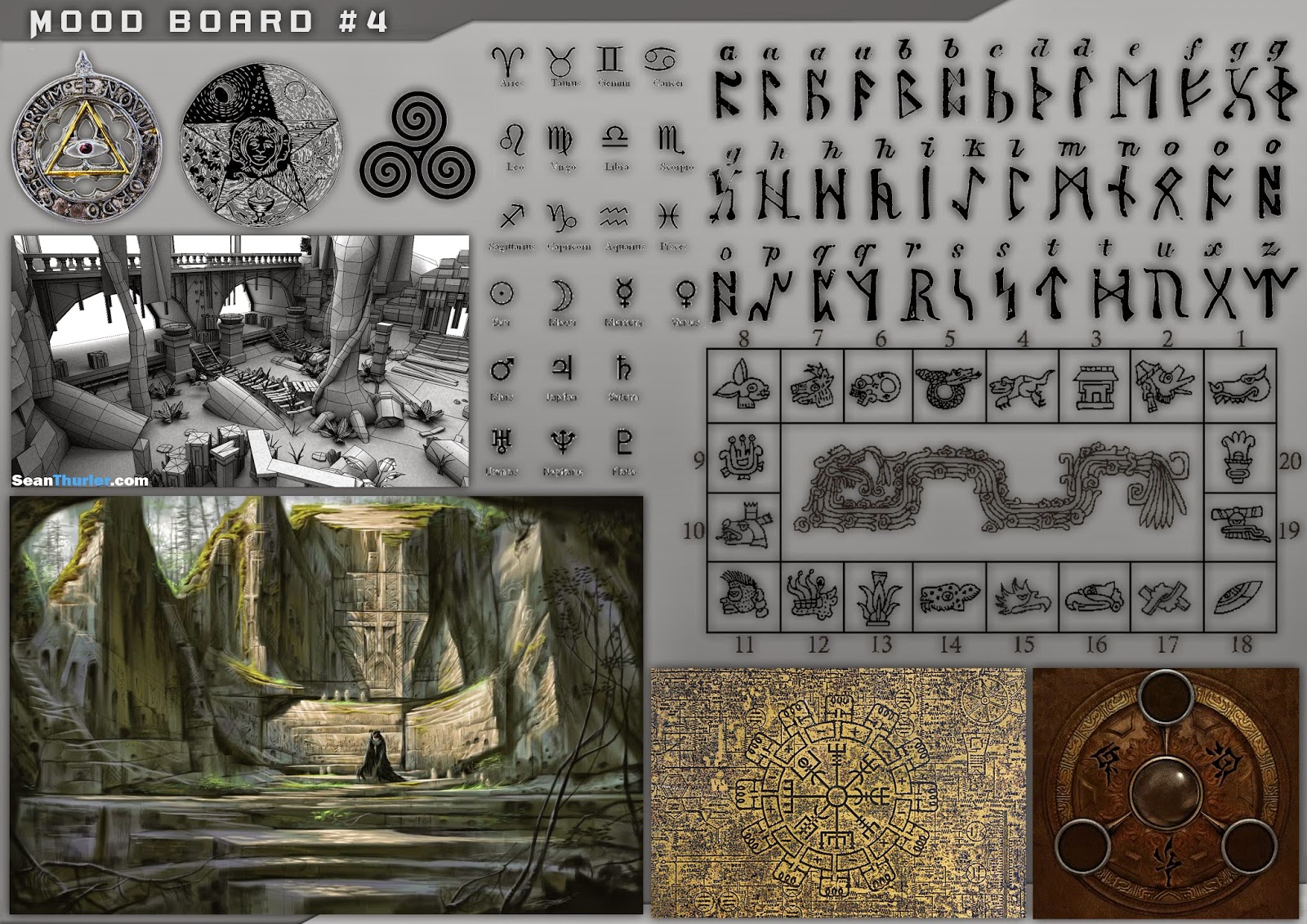
I began with some moodboards for inspiration and to get a feel for what it was I was after:


Here are the concepts for the Ancient ruins:


I had trouble doing all of this because 2D isn't a big strong point of mine as it takes me a long time do get something that looks good to me. I had a very fun time producing this work and it made me much more confident in both drawing, and my ideas. Also, I was practising getting my ideas out of my head and onto the screen in a fast fashion. I used Feng Zhu's tutorials on YouTube to help me just relax and 'go for it'/'just draw' style.

The concepts for the character:


I'd say that in retrospect, I really should have done more concepts as I only produced one actual shot. I needed to have done a layout of the level, the scale, what I'm going to make... Just a lot more planning. Therefore, it didn't turn out how I wanted it do, but it wasn't exactly a complete mess! However, having done this on my own and making these mistakes, I now know that when it comes to other projects/doing my FMP, I need to make sure I know exactly/>90% of what it is I want to do so there isn't any faffing about trying to come up with fast (and probably bad) ideas as I go along - essentially making it up. This effected how work produced dramatically because I wasn't sure want I wanted or how I wanted the rest of it to look like!
Nevertheless, I did manage to get a decent amount done, just not the amount I should or could have done with the time I had.

I got off to a very good start because I actually knew most of the foliage I wanted to make. It only took between 2-3 weeks to make all of the foliage from start to finish and I was very proud of what most of them looked like, although, there were a few I weren't keen on because again, I made them up just to make use of the texture sheets I made:


Mushroom texture sheet:


When I first made the trees in year 1 at DMU, I found it very laborious as you had to go through a lot of effort just to make the branches, then position every single one. However, coming back to doing a similar thing, I thought it was great fun! I am a bit disappointed I didn't make a cycad tree but I'll hopefully make one soon. I am no longer disheartened at the idea of making any foliage because I find it really enjoyable and when the end product looks good, it makes you feel 100x better.

The first plant I made
Plants from smallest to largest (height):


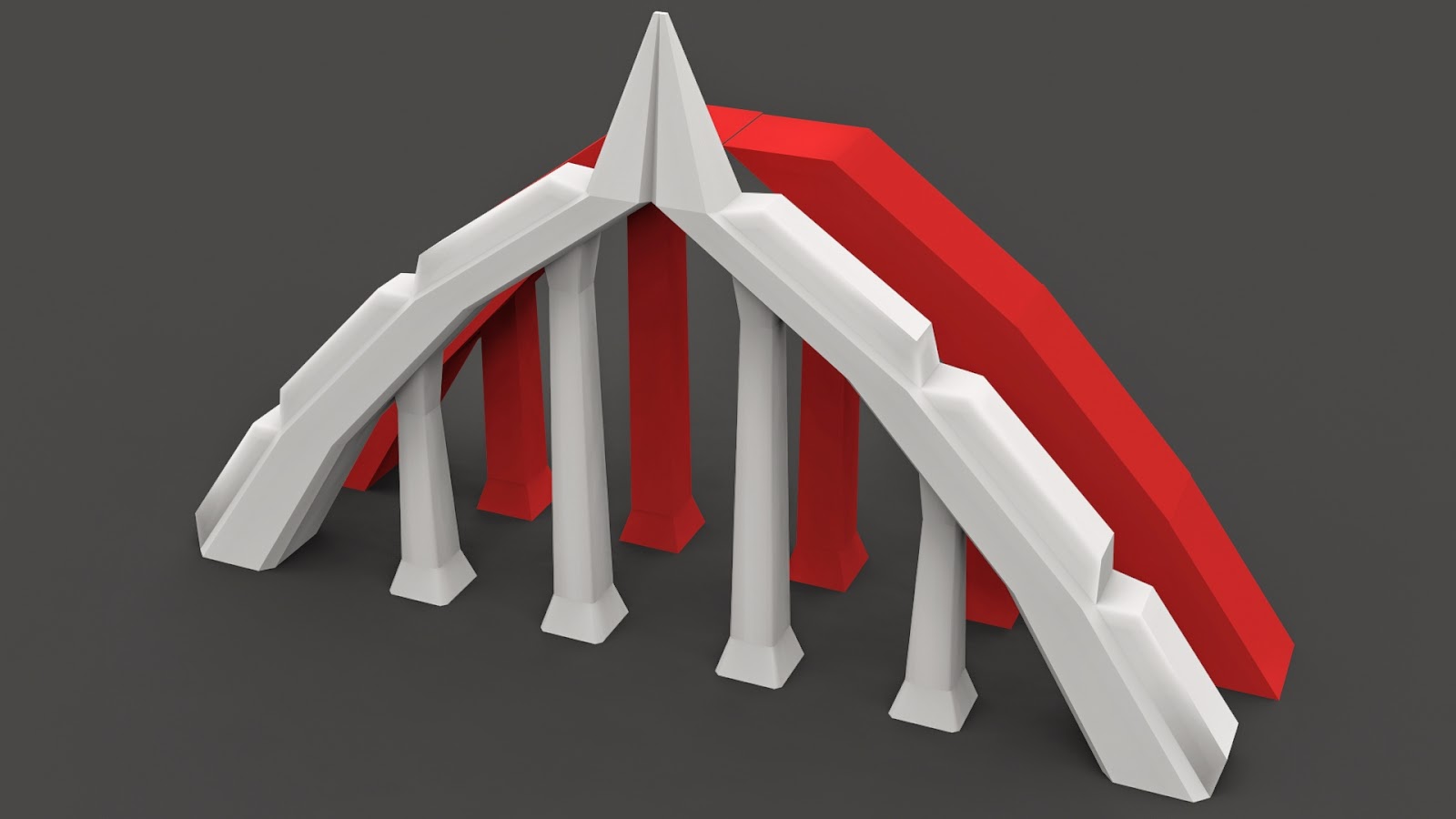
At this time I was thinking about how I wanted to make the door in the concept art. I therefore made the structural assets and worked on some of the landscape/rocks.
The problem with working without a decent amount of planning on how you want the level to look, you end up making things which don't make sense, going off on a tangent which is almost irrelevant, and making it all a bit jumbled.

The vines I made on alpha planes were actually made using an LOD technique from 3D models I made in 'Sculptris'. Therefore, this allowed me to make these vines all under 8 tris per branch.


I also did some research into the 'giant red trees' and thought they would make a good addition to this project:


This covers the majority of the foliage I produced for this project, now onto the other assets:


The different rocks:


These all don't look very nice in 3ds max - in the game engine, they look so much better.
Anyway, off of the boring stuff and onto the character!

Despite having reference for the character I wanted to make, he ended up looking nothing like that because a) I had to abide by the original tri budget of 5000. b) I actually wanted to have a go at modelling my own head. c) I went off on a tangent.

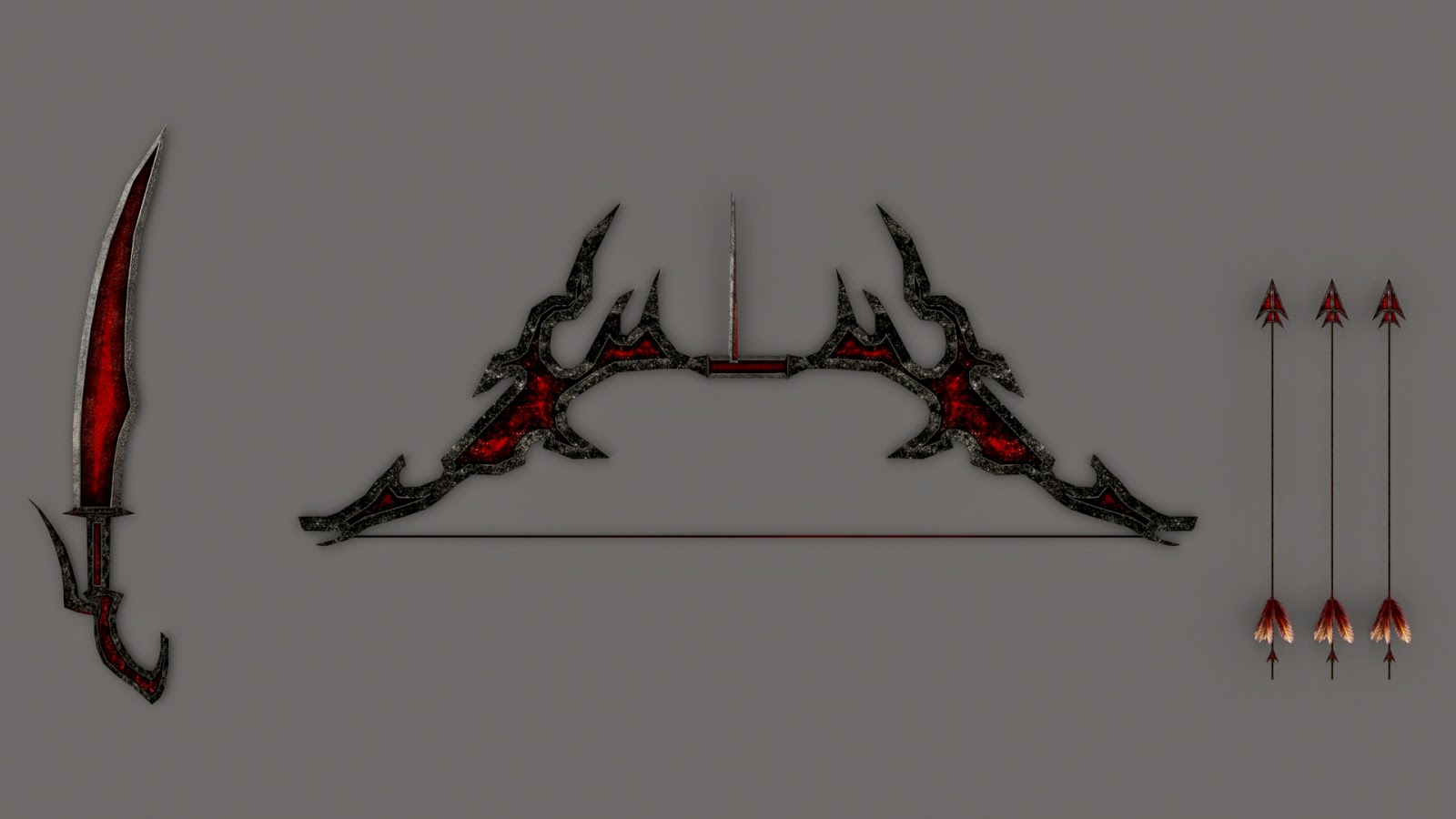
Here's the weapons I made for him:


The character + Alpha for the weapons:


Smoothed
Huge line on neck is due to ambient occulsion map (Didn't take it out)

I have to admit that he does certainly look like me...

Throughout the process of making these models, I had already started a UDK map and have been importing them to see what they look like in the game engine. This allowed me to put together a little 'test' map to see all of the foliage together and some of the other assets:


Once I was happy with the base meshes, I started to make the actual map.

I knew I wanted some sort of a mountainous terrain, just to give it a location, so I looked for tutorials on how to make one and viola... This came out:


It was hard because I could only use 4 textures (I think) for the terrain paint tool. This was because each texture actually has 3-4: Diffuse, Specular, Normal, Height. So, I made-do and it turned out how it did, but I really wanted to squeeze one more in and add snow to the peaks of the mountains.


I know the setting doesn't make sense at all, I.e., snow-topped mountains, then just a random bunch of trees and rocks in the middle, but it meant that I learnt a variety of techniques for different settings, and not just the one.
From here on in, I just started to piece things together to make some kind of sense of them and this was the outcome that followed - (The total tri count for the assets made was only between 12-15,000):


Points to improve upon + Short summary:

Points to improve upon:

-When attempting something this big, make sure to have done sufficient planning of the layout, models to make, and things to do + Concept the ideas thoroughly so I know what I'm doing when it comes to 3D. Blocking out some level ideas first would have been very helpful.

-Organise what things are likely to take up the most amount of memory, e.g. texture map sizes for terrain + characters, and ask myself "is it worth having it in 512x512 or could it really be 256x256 or even smaller?".

-Make an asset list with rough tri counts to abide by, giving an estimated total tri count; update it as I go along,

-Make the most important things first. Everything is made to have a purpose, so design my ideas around what the purpose of it is.

-Think about interactive elements which could be implemented to make it more interesting.3

-Define some colour palettes to be used so that the textures are coherent.

I loved the project as a whole because it made me a lot faster at all of the processes, from modelling, right down to putting it in the game engine and testing it all. Even though a lot of it was rushed, I learnt a lot of different material techniques, modelling tips, and ways to improve my workflow along the way. I came across some challenges, 1 e.g. how to make a terrain & paint foliage/materials onto it, and learnt how to do so. If I didn't do this project, the first past of 2nd year would have been that little bit more challenging as I wouldn't know how to do certain things, or be too slow at a process and end up losing out for the final product.
All in all, I made sufficient progress in most areas from the 2D Visual design + research, to the 3D side & workflow aspects.

Thursday, 11 December 2014

DMUGA Week 11 - Character hand in! (+ Post Mortem)

We come to an end in this tale of ups and downs, and we say hello to the good experience that comes with having dealt with a character project of this nature. It's obviously not all bad, I'd almost like to say I wished to have tried a more realistic instead of stylised approach, but would it really have been that much more beneficial? - Post mortem at the end of the blog...

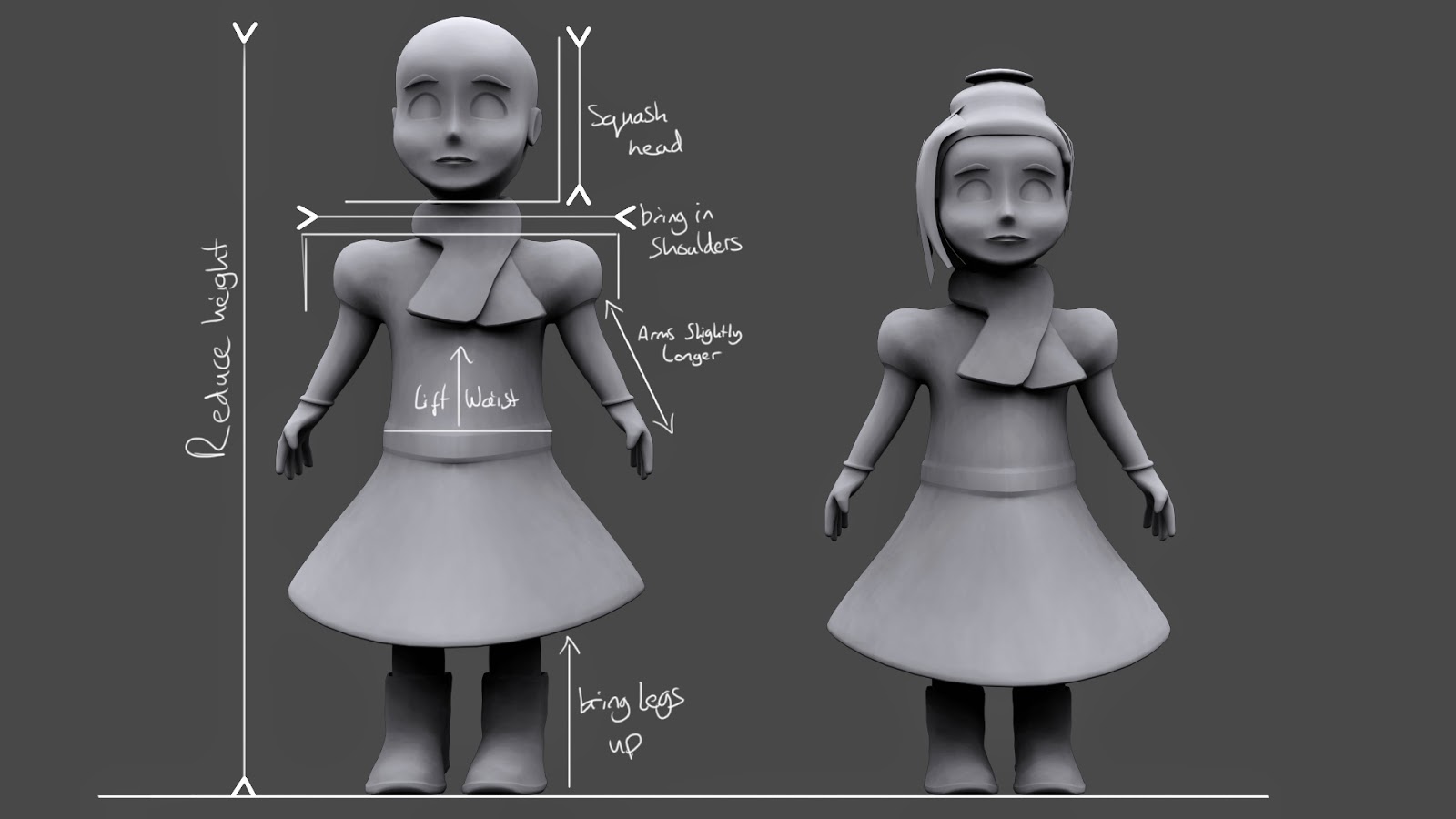
Monday was a good day - enough said! In all seriousness though, it was useful because I got some greatly needed help from Steve for the proportions of the girl, they are subtle changes but do effect how you interpret the model. I also did a few tweaks here and there for the rigs of the characters.


Tuesday's life drawing went alright, which in fairness is better than how I usually think they go. I tried using a donkey again this week because I really do feel that I work better on them than an easel. We just focused on hands, feet, and the head like last week, and I ended up with a similar drawing as last week's too. This does show me however that I do seem to work better on a donkey and I really like the white highlight technique on the brown paper (This is now the standard so it's the last time you'll hear about me using a donkey by the way...).


Furthermore, I also used Tuesday to try and fix some problems with the rig for the girl, and clear up my files so that I can put them onto the K-drive ready for Wednesday. This time was also used to do some renders of my characters and organise the unreal/game engine scene, alongside putting together the asset document.


Wednesday involved clearing up all of my files, doing final renders, organising everything for the hand in, and doing some crude animations for the tutors to laugh at when they're marking:


Here's some more renders:


Post-Mortem

I now have actually modelled a child with decent proportions, and have learnt a great deal about a faster workflow when it comes to ideas/iterations. Given the original 3 week project deadline, I think I chose correctly to do stylised because it is a lot faster than spending hours on a realistic design, then either starting again or changing it greatly. Even though I didn't do as much as I could have with the simplistic approach, if I chose realism, I probably would have far less to show and it may have not even been good quality either.

In addition, I have 2 characters, both rigged to a certain extent, and look like they could belong together with dichotomous personalities... That was the brief. If I chose realism, I most likely would only have 1 character. I am combating my fear of Z-brush some more by also watching some tutorials online to help me get started with it so that I too can create high poly meshes to use for baking.

Conclusion:


Overall, the project was quite successful in my opinion because the brief was to create to design 2 dichotomous characters that could exist in the same world - any style applies, and that is what I have done. In addition, the design of my robot is quite strong and very recognisable just from the silhouette - it can easily be made into a symbol/logo:


Also, the visuals of the robot & girl from the size, colour and shape all imply certain characteristics which don't need to be explained for the audience to understand what their personalities are like (the robot is clearer than the girl).

Outline of processes:

In steps, my entire process was: Moodboards, word list, brainstorm, refined moodboard, colour palettes, silhouettes, sketches + development, feedback (Presentation), changed idea sketches & orthorgraphics, base models, colour experimentation, more refinement/finished ideas & models, 2nd feedback, changes, rigs, animations, engine.

Concepting: I actually didn't have a clear idea on what I wanted to do until I reached the silhouette stage, and even then, I didn't know what my characters were going to look like at all. The whole reason of doing the steps before the silhouettes were to hopefully find something which would inspire me - and I did. The image that triggered my idea was in my 2nd moodboard; it looked like a father and son robot, and I knew I wanted to make two characters which the audience can emotionally connect with.

My first idea for a robot was based off of the 'scale' page in which I changed the size/scale of the silhouettes and decided which relationship I wanted to follow. This was a large robot and a small girl - Robot keeps falling apart, and the girl puts him back together etc. However, after the feedback, it was clear that this idea was too comparable to the 'Iron Giant'. Therefore, I went for a different approach and pursued the idea of a small girl and an even smaller robot. This created an 'owner/pet' relationship.

Once I developed one of my silhouettes further, I produced the orthgraphics for him and begun modelling. After I made the base mesh, I decided they weren't dichotomous enough and tried to make the robot with a hint of evil/negativity. This made a whole new personality for him by which I then altered the mesh and pinged him back into Photoshop for colour development.

Alongside side this, I also developed the girl and modelled the base mesh. I then went through some more 2D development with her and colour exploration. The base mesh was refined, textured in a very basic fashion, then rigged.

Modelling: From the orthographics I made in Photoshop, I modelled both characters and altered them in 3D to my best judgement (e.g. proportions). There was only one small problem when I started modelling and that was to make the robot's 'fin-like' arms run seamlessly from the front of the face to the side. This was a good modelling challenge and was overcome through looking at the topology of a dolphin's fins. I made the base mesh very fast in around 1 day (including unwrapping), which was a very good choice to make because it meant I could iterate and develop the mesh further into the 'evil' robot character.

The girl was also modelled rather fast, and there weren't many note-worthy challenges when modelling the girl as her geometry is very simple, but I did have a problem with the ears, lips, and hands. The ears and hands were made separately and I had to attach them which created a couple of triangles, and the lips were just very hard to get the form of. The part that took the longest unsurprisingly was the face - I took a very long time to get round to developing her face in 2D and therefore delayed the modelling in 3D durastically.

Unwrapping: The initial mesh I made for the non-evil robot (Blue), was very difficult because It took me an entire day of fiddling around and yielded no results. It wasn't that I couldn't unwrap the mesh, it was that the UV'S were so organic and curvy that I couldn't fit everything on the texture sheet without having a fairly large amount of what looked like 'wasted space'.
Therefore, I was actually very happy to change the idea to the 'evil' robot because by adding in the spikes, it broke up the unwrap for me and altered the shapes enough for me to get a very tight unwrap.
Unwrapping the girl was very straight forward and I didn't come across any problems.

Texturing: The textures for the robot were supposed to be rather 'clean' ones, as if the robot was just new out of the factory. After doing the colour development, I already knew what the base colours were going to be and I worked from there. I didn't want it to be just plain, so I did add some variation to the colours, but not too much. My Photoshop file is very organised and each different texture can be found in their separate folders. I tested the textures in Marmoset and adjusted them to my needs before putting it into the game engine.
The texturing for the girl were simple base colours as they were done rather late, and I know that there isn't enough detail in them.

Rigging: Initially, I found it a little bit confusing to rig my robot character because I couldn't actually move the leg bones away from the pelvis and inside the robots' legs, but I realised this doesn't actually matter because it could all be done when it came to weighting them. It took me a few tries to get it to a decent stage, and now there isn't large, noticeable problems when animating. The biggest issue is most definitely moving the arms as the shoulder clips into the head if the arm moves across the body.
There was also a big issue with the shoulders on the girl character, and on the dress because the legs clip right through it. This was better than what I previously had so I had to accept that I couldn't change it.

Engine: The process for the engine was simply importing the meshes/textures in, creating the materials, and setting up some basic lighting. One problem I did find however is that the robot's eye didn't show up in a lot of renders, but that was because the way I made him was that there is a glass material in front of the eye with refraction included - this meant it pretty much disappeared from acute camera angles.

How I could improve:

-I can definitely say that in order to improve my work, I need to do more colour exploration. Even though I did quite a few for the robot, I don't feel as though I utilised my colour palettes from early on in the project. I picked some images that had colour palettes I liked, but I didn't use them as best I could have.

-My first improvement links with this one because I feel as though I didn't do enough detail. Despite them being stylised and simple, I think I over simplified it by not adding any details on the girls dress for example - it is too plain. I think that my ideas could both be further developed by adding in details like pockets on the dress, a zip, a pattern, shoe laces, fur on the top part of the boots etc. The robot could do with more details, but only subtle ones because the design is supposed to be simplistic and easy to read anyway, so not much more needs to be included.

-In terms of the whole workflow, it felt good, however, I think that I didn't explore other ideas which immediately limited me to just robots and/or humans. This was because in order to stay on schedule, I had to settle on an idea and get to the orthographics as fast as I could, ready for feedback in our presentation. This was made worse by the fact I wasn't sure on what I wanted to do by the Tuesday evening on the week of our presentation for Thursday morning.
This isn't too much of a problem as the time was very limited, but it does expose me in the sense that I didn't explore my other ideas.

-Decide on specific materials for the elements because this will help me when it comes to the values + texturing stage. This will make sure that I don't end up with a 'block' and not know what materials to make different parts look like and thus, wasting time. I have done this in past projects, and I kind of did it in this one when it came to the robot, but I ended up going on a tangent a bit in the texturing and ended up with undesirable results. It is very evident to see this for the girl though because it literally is almost just a flat colour and no "feel or smell" sense added to it.

Sunday, 7 December 2014

DMUGA Week 10 - Project not going so well...

I finally addressed the face issue this week and I can safely say it is a relief to finally have it more or less figured out. In other news, I think I may have found a big problem with the way I've been going through life drawing on Tuesdays...
Furthermore, I know we have been given until next week to complete this project, and I aimed to get it done for this Thursday, but after Monday I really wasn't sure if I should present this week or not - I originally planned to have more done by this point in the project. Also, things are starting to go a bit wrong as I'm losing focus on the outcome and I'm no longer happy with the characters I've made... *Sigh*

The issue of the face was dealt with on Monday where I thought "Just do it, gather some reference and just draw". The morning wasn't a great success as there was a lot of wasted time with Photoshop being very slow (Might be my file size - but it's only about 300MB!). Here's the face that came to mind for this character:


I was rather happy with how the face turned out in the quick drawing, I now just needed to start modelling it... right after I fix the proportions of her body which now look so badly wrong with the addition of an actual face.

On Tuesday, I received some feedback from Chris on the proportions of the girl and how they do not fit anatomically to real life. We therefore looked at Andrew Loomis's proportion diagram to see how much needed to be fixed for it to look right. It turns out that it isn't close at all to the proportions of a normal 3-5 year old. Now, this is supposed to be stylised, so proportions can be exaggerated in order to create a desired effect - What better character to use as reference than 'Boo' from 'Monsters Inc'?


In addition to the feedback on the girl, the textures for the robot were referred to as "not ringing true", and I therefore made 3 other texture sheets for the robot based on the suggestions made, just to see if any of the others work more than the one I've already got. Even though they were quick modifications, it was just to see if a slightly different combo worked better or not.


Lightmap
I also began modelling the girls face on Tuesday, of which I finished on Wednesday and it turned out alright, but it still looks just so wrong:


Life drawing this week was so much fun, I actually ended up with a drawing at the end where I wasn't disappointed to show it. This kind of happened last week as well when I used a donkey instead of an easel. This tiny change from standing up to sitting down drastically affected how I worked and I felt a lot more comfortable doing so.


In the future, I am going to try and use a donkey (if available) when doing life drawing because I have noticed quite a rather big different in my work when I am sitting down compared to when I'm standing up.

Wednesday was a bit of a weird day because I didn't know when I'd be presenting until halfway through the day, so I therefore spent the afternoon/evening deciding on what to put into the presentation/making slides for it, and not getting much further in the project itself. However, the morning was spent unwrapping the rest of the first character 'Blue', and putting on a base texture just to see what he'd look like... This is what I'm talking about when I titled this blog "Project not going so well...", alongside my thoughts after the feedback on Thursday.


Thursday was presenting time and I have to admit I am getting a little bit less nervous each time I present which is a good plus. However, here's the feedback:

-My robot character anatomically doesn't make sense not to include some sort of hands
-Eliminate the spine on the robot
-Sort the proportions out on the girl (Which I thought were OK)

I just feel like I've tried to please everyone when make my choices for this project, and now I've ended up with 2 characters I don't really like. I think I would have much more enjoyed this second half of the project if someone else gave me their designs to model and I made/rigged them.
Obviously, I'm going to act upon their feedback because that's what you do, I don't think it'll make much difference to their overall opinion though, so it's almost like faffing around with little details when I may have just made a whole new character instead.

The rest of Thursday was spent changing the girls face a little bit, making a LOD of the robot in 5K tris, and modelling the scarf/unwrapping the majority of the girl again.


Last but not least, Friday was spent beginning to make the modifications on the robot and the girl's ears.


Already from this screenshot of the head, I definitely need to change the shape of the head itself (Side view looks wrong), and make the ear a little bit bigger.

In summary, not a too productive week and I'm just looking forward to what the next project is because I know that I'll do so much better on it already. Heads up though, next week is the last week before Christmas and I'll wrap this project up, then unwrap some presents very soon - my favourite time of the year because it's the easiest 'unwrapping' I've done all year long!